
Call us now :08071793922
 Send Inquiry
 Send Inquiry
Ubiquiti Unifi Switch
MOQ : 1 Piece
Ubiquiti Unifi Switch Specification
- Device Type
- Managed Network Switch
- Power Consumption
- Maximum 30W
- Remote Control
- Yes
- Power Supply
- 100-240VAC, 50/60 Hz, Internal power supply
- Operating Temperature
- -5°C to 40°C
- Dimension (L*W*H)
- 442.4 x 43.7 x 200 mm
- Frequency
- 50/60 Hz
- Weight
- 2.8 kg
- Network Device
- Ubiquiti Unifi Switch
- Interface Type
- RJ-45, SFP
- IP Routing
- Layer 2 switching
- Usage & Applications
- Enterprise networking, office, server room
- Port
- 24 x Gigabit Ethernet Ports, 2 x SFP Ports
- Features
- Managed, VLAN, SNMP, QoS, UniFi Controller support
- Connectivity Type
- Wired
- Number Of Ports/Pins
- 26 (24+2)
- Cable Length
- Up to 100 meters (Ethernet)
- LED Indicators
- Per port and system
- Switching Capacity
- 52 Gbps
- Total Non-Blocking Throughput
- 26 Gbps
- Material
- Metal chassis
- Management Interface
- Web-based UniFi Controller
- Forwarding Rate
- 38.69 Mpps
- Mounting
- Rack-Mountable
- Maximum Power per Port
- 15.4W (PoE model only)
- MAC Address Table Size
- 16K
- Operating Humidity
- 10% to 90% non-condensing
Ubiquiti Unifi Switch Trade Information
- Minimum Order Quantity
- 1 Piece
- Payment Terms
- Cash Advance (CA)
- Supply Ability
- 100 Pieces Per Week
- Delivery Time
- 3 Days
- Main Domestic Market
- All India
About Ubiquiti Unifi Switch
There is a Ubiquiti Unifi Switch is a range of fully managed, PoE+ Gigabit switches that deliver robust performance and intelligent switching for scalable networks. It also offers additional fibre uplink connectivity options. UniFi devices all tie into the UniFi controller web interface and mobile application, which are your main way to monitor and configure the network. It is used to obtain an IP address (connected devices will also obtain IP addresses after deployment). The Ubiquiti Unifi Switch is very effective.
High-Performance Switching for Modern Networks
Designed for demanding environments, the Ubiquiti Unifi Switch boasts impressive performance metrics-52 Gbps switching capacity and 38.69 Mpps forwarding rate. Its non-blocking 26 Gbps throughput ensures smooth, high-speed data transfers, ideal for growing enterprise infrastructures requiring consistent and reliable network resources.
Versatile Connectivity and Power Solutions
This switch provides 24 RJ-45 Gigabit Ethernet ports and two SFP ports, accommodating both copper and fiber links. For PoE models, each port can supply up to 15.4W, enabling seamless integration with wireless access points, IP phones, or cameras within a 100m Ethernet cable range.
Intuitive Centralized Management
Manage your network effortlessly through the UniFi Controller-a user-friendly, web-based interface offering remote control capabilities. Monitor performance, configure VLANs, and optimize QoS, all within a single, consolidated platform, ensuring streamlined network administration.
FAQ's of Ubiquiti Unifi Switch:
Q: How do I manage and monitor the Ubiquiti Unifi Switch?
A: You can manage and monitor the switch centrally using the UniFi Controller, a web-based platform allowing remote access to configuration, monitoring, firmware updates, VLAN setup, and advanced network management features.Q: What are the practical applications for this network switch?
A: The Ubiquiti Unifi Switch is perfect for enterprise networking, office setups, and server rooms where high-speed, reliable, and secure wired connectivity with advanced management features is required.Q: Where can the switch be installed, and what mounting options are available?
A: This switch is designed for rack-mount installation, making it suitable for integration into standard network racks typically found in server rooms, data centers, and professional office environments.Q: What is the process to enable Power over Ethernet (PoE) on this switch?
A: If you have the PoE model, simply connect compatible devices to the Ethernet ports. Each port supplies up to 15.4W of power, automatically powering devices such as IP phones or access points without extra adapters.Q: What are the benefits of using the UniFi Switch for enterprise networks?
A: Benefits include high throughput, robust Layer 2 switching, PoE support, centralized management, comprehensive VLAN and QoS options, and reliable operation even under variable humidity and temperatures, ensuring seamless connectivity for business-critical applications.Q: When should I use the SFP ports instead of standard Ethernet?
A: SFP ports are ideal for high-speed fiber connections or linking network segments over longer distances than standard Ethernet supports, enhancing scalability and resilience in your infrastructure.Q: What steps are involved in monitoring the switch's status?
A: You can use per-port and system LED indicators for a quick hardware overview. For comprehensive monitoring, access the web-based UniFi Controller to review active connections, port utilization, and event logs in real time.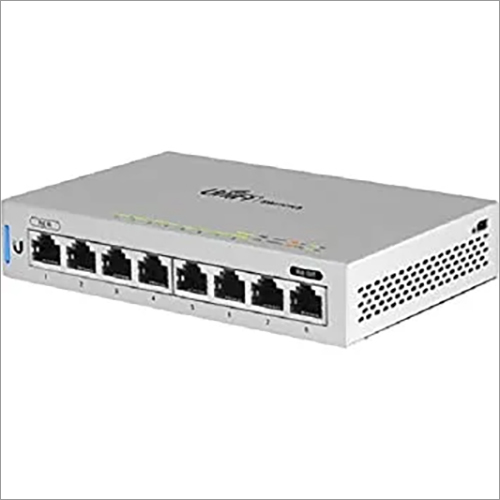
Tell us about your requirement

Price:
Quantity
Select Unit
- 50
- 100
- 200
- 250
- 500
- 1000+
Additional detail
Mobile number
Email

More Products in Ubiquiti Networking Products Category
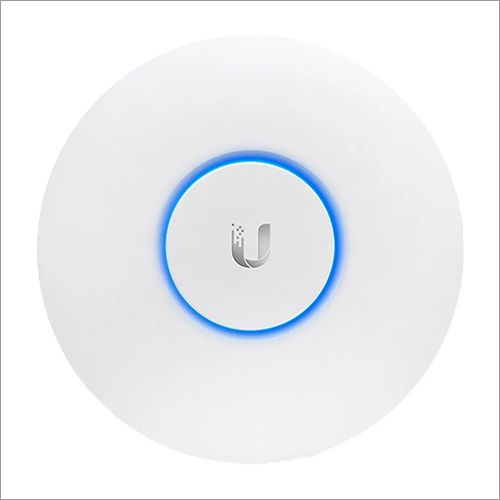
Ubiquiti UAP AC Lr UniFi
Price Range 1500.00 - 5000.00 INR / Piece
Minimum Order Quantity : 1 Piece
Connectivity Type : Other , Wireless (802.11 a/b/g/n/ac)
Remote Control : Yes
Power Supply : Other, 24V, 0.5A Gigabit PoE Adapter (Included)
Power Consumption : 6.5W (Maximum)


 Send Inquiry
Our Products

OFFICE NO.1103,89, NEHRU PLACE,New Delhi - 110019, India

Mr Vishal Sharma
(Proprietor)
Mobile :08071793922
 Send Inquiry
 Send SMS
Developed and Managed by Infocom Network Private Limited.
